Windows · macOS · Linux

From click to label.

Your 4×6 comes out a 4×6 (sharp, edge to edge), straight to any printer you already own. Unlimited labels. No per-print fees. No browser dialogs.

Free forever for one computer · no account needed to print · installs in seconds

Unlimited prints
No per-label fees
Any printer brand
Local & private
The whole trick

Three things, one printed line.

Your web app talks to a tiny local agent, which talks to your printer. That's it: nothing leaves your machine, no drivers to wrangle.

Web App
paperready.studio
Print Bridge
this computer
Label Printer
Zebra · DYMO · Rollo
Design

Design the label, then print it.

A real designer in your browser. Barcodes, QR, your logo: laid out once, printed at true size, forever.

Drag-and-drop designer

Text, images and shapes on the exact size you print: 4×6, 2×1, custom, or a full Avery sheet. See the designer →

Barcodes & QR, built in

Code 128, QR, Data Matrix, PDF417: sharp and scannable, no fonts. Barcode labels →

Dates & serial numbers

Auto-fill the date and increment a serial on every label. No spreadsheet. Auto-numbering →

Your logo, on the label

Upload it once, reuse it everywhere. Your brand on every package.

Shapes, lines & rotation

Boxes and rules to frame the label. Rotate any element to any angle.

Preview at true size

The canvas is the real label size. What you see is exactly what prints.

Real output

This is what comes out.

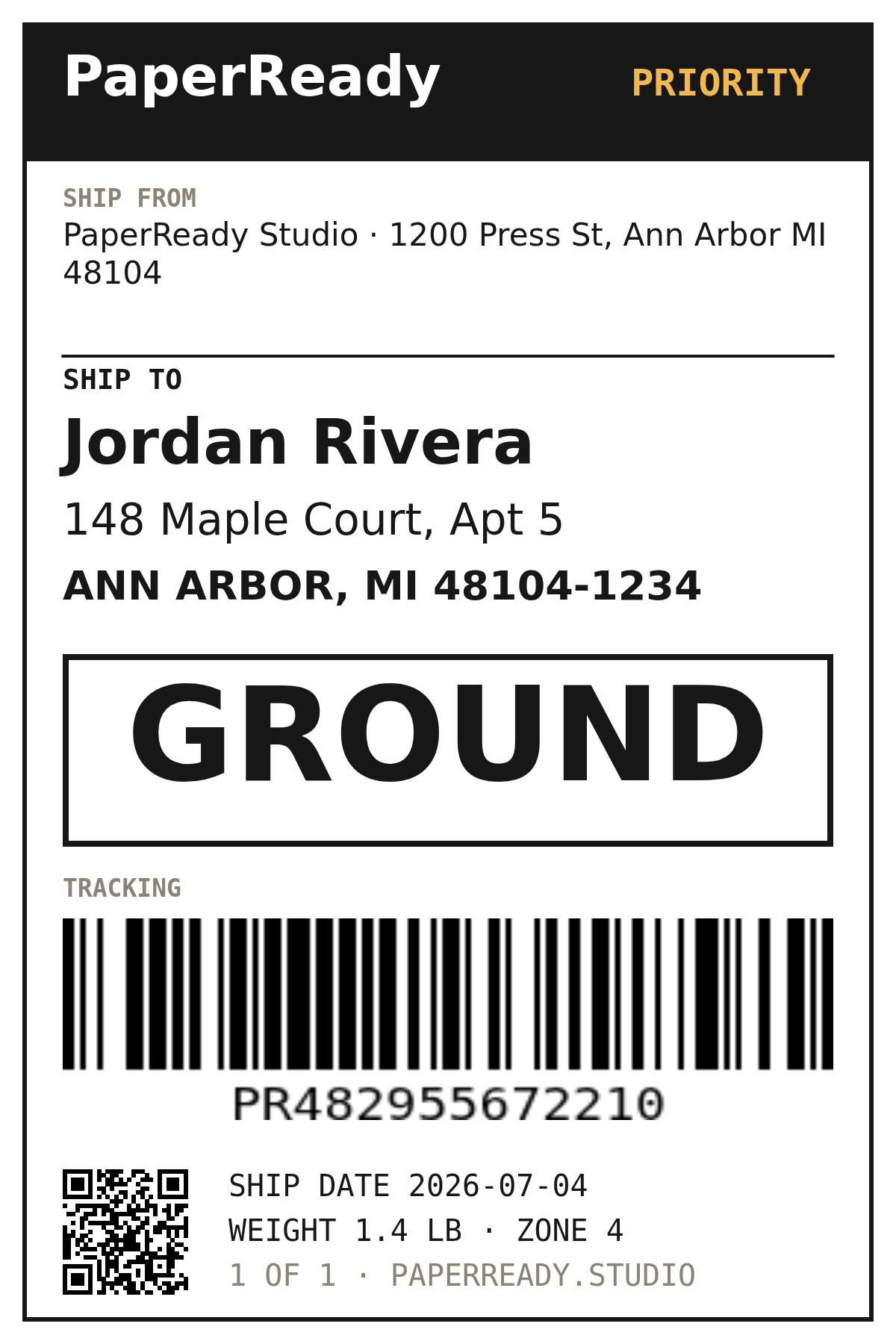
Not a mockup: an actual 4 × 6 rendered by PaperReady's own engine, the same code that sends it to your printer. Scannable barcode, live QR, your fonts baked in.

A real 4×6 shipping label rendered by PaperReady: PRIORITY header, a SHIP TO address block, a large GROUND service band, a Code 128 tracking barcode, and a QR code
Rendered by PaperReady · 4 × 6 in · 300 DPI
  • Real Code 128. Scans on the first pass: drawn as bars, not a barcode font.
  • Live QR. Encodes an actual tracking URL, generated right on the label.
  • True 4 × 6. Edge to edge, exact size, never shrunk to fit a letter page.
  • Your type & layout. The fonts, weights and spacing you set, pixel for pixel.
  • The preview is the print. One engine renders the canvas, the PNG and the printer.
  • Open the designer

Seeing is believing. Print one yourself.

Get the free agent

Free on one computer · no account needed · installs in seconds

Automate

Print without lifting a finger.

Batch from a spreadsheet

Map a CSV, print the whole run in one pass. Hundreds of labels, one click. Mail-merge →

Auto-print Shopify orders

Every new order prints a label on your bench, automatically. Hands-free. Shopify printing →

Print from your own app

Reach your users' local printers from your backend ($0.01 a print). Cloud API →

On the bench

What PaperReady handles.

Auto-detect printers

USB and network printers show up the moment you plug them in. No setup.

True-size 4 × 6

Edge to edge, never shrunk to fit a letter page.

Skip browser dialogs

Straight to the printer. No pop-ups, no “save as PDF”.

Reprint from history

See what printed, reprint in a click. Export it all to CSV on Business.

Works with your gear

Zebra, DYMO, Brother, Rollo, MUNBYN. If your OS sees it, we print to it.

Local & private

The bridge binds to your machine. Labels never leave your computer.

Stop paying per label

Not another metered printer tool.

Printing happens on your own machine, so it costs us nothing, which means we never charge you for it. You pay to run an operation, not to press print.

Per-print tools

Fractions of a cent per label, daily caps, a paywall mid-shift.

PaperReady

Flat price. Print as many labels as you want, on every plan, forever.

Brand-locked software

A different app for every printer: Zebra here, DYMO there, Rollo somewhere else.

PaperReady

One app for every brand your computer can already see.

Bundled connectors

A $100-plus-a-month platform subscription just to print a shipping label.

PaperReady

Standalone. Free to start, $12/mo when you outgrow one desk.

Trust

Your labels, your machine, your data.

Local-first and private by design. Here's exactly what that means, no fine print.

Nothing leaves your machine

Print locally and the label goes straight from your browser to the printer. It never touches our servers.

No open ports

The Print Bridge listens only on localhost. It never opens a port to the internet.

No trackers, no ads

First-party, cookieless analytics: no third-party trackers or ad networks, ever.

Yours to take

Raw ZPL, an open API, and CSV export. Your designs and data leave with you, no lock-in.

Free, and it keeps going

Free forever on one computer. Cancel a paid plan anytime and keep all your data.

Open in the print path

Built on self-hosted, MIT-licensed libraries: no CDNs or third parties between you and your printer.

Pricing

Free to start. $12/mo when you grow.

Unlimited printing on every plan. Pay for workstations, batch printing, and full history, never for the labels themselves.

Label recipes

Print from anywhere.

Unlimited labels. Zero per-print fees.

Get the free agent

Free on one computer · no account needed · installs in seconds

For developers

Embed printing in your product.

Print from your own app straight to your users' label printers. The local API is free and client-side; the metered cloud API prints from your backend at $0.01 per delivered print, with API keys, usage, and billing in a dedicated developer console.

$ print from your backend curl https://paperready.studio/api/v1/print \ -H "Authorization: Bearer pr_live_…" \ -d '{"printer":"Zebra ZD421","data_base64":"…"}' → 202 { "status": "queued" }
From the maker

Sean Hilton

Founder, PaperReady

An independent product by Hiltos LLC, Michigan

Printing a 4×6 shouldn't mean a $100-a-month platform, a brand-locked app, or a label shrunk into the corner of a letter page. So I built the missing piece, a tiny local agent and a real designer, and made printing itself free.
Questions

Straight answers.

Is it safe to let a website talk to my printer?
Yes. The Print Bridge only listens on your own machine and never opens a port to the internet. Only paperready.studio can reach it. When you print locally, your label data never leaves the computer.
Does it work offline?
Local printing works with no internet: the browser talks to the Bridge on the same machine. You only need a connection to sign in or to use the cloud API.
What if I stop paying?
You drop to Free and keep all your data. Nothing is deleted. Printing on one computer stays free forever, and you can export your history to CSV anytime.
What if PaperReady shuts down?
You're not locked in. The Bridge prints locally, you can send raw ZPL, use a documented open API, and export your designs and data, so you're never stranded.
Why trust a brand-new tool?
Because it's built to be checked: local-first, an open API and OpenAPI spec, self-hosted open-source libraries, and no per-label lock-in. Start free on one computer and see for yourself before you pay a cent.
Do I need special drivers?
No. PaperReady prints through the drivers your OS already has, so any installed printer works: Zebra, DYMO, Rollo, Brother, MUNBYN and more.

Ready to print?

Install the free agent, connect the printer you already own, and send your first label in about a minute.

Get the free agent

Free forever on one computer · no account needed to print · installs in seconds